 Cabinet & furniture CAD

Design cabinets and furniture, get cut lists, optimised sheet layouts, costs and drawings.
Kerfwise is a free cabinet and furniture CAD that runs in your browser. Build kitchens, wardrobes, bookshelves, desks, tables and beds from parametric cabinets with real joinery — including diagonal, L-shaped and angled corner cabinets — then get a grouped cut list with edge banding, guillotine or CNC sheet layouts (shaped parts too) with yield, offcuts and a lower bound, CNC G-code with drilling, a hardware list, a full cost estimate and dimensioned production drawings. Projects stay on your device; the same engine is available as API and MCP tools.

Screenshots
 Diagonal corner, one-piece L worktop and angled end cabinet in 3D
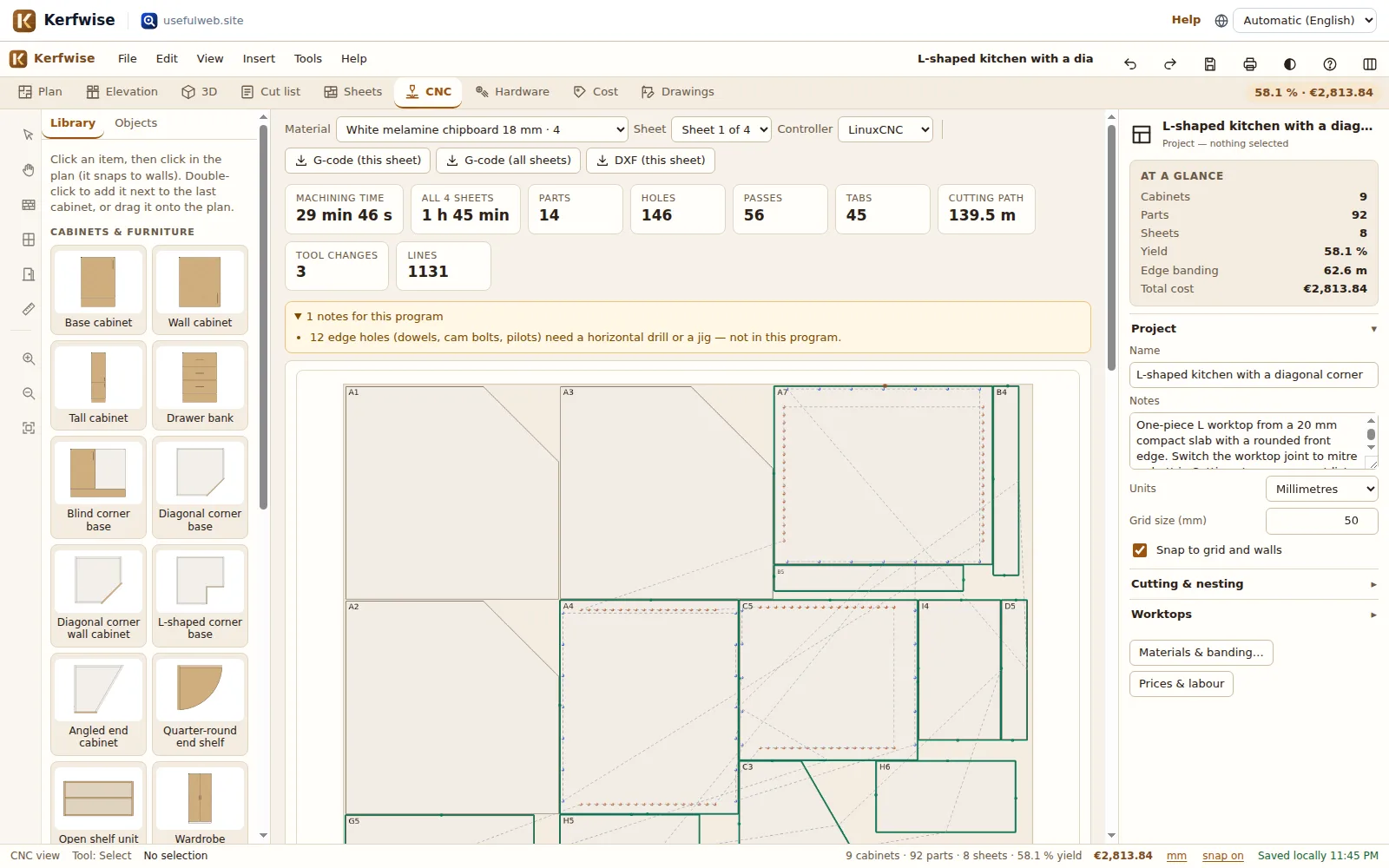 CNC export: toolpath preview, G-code and machining time
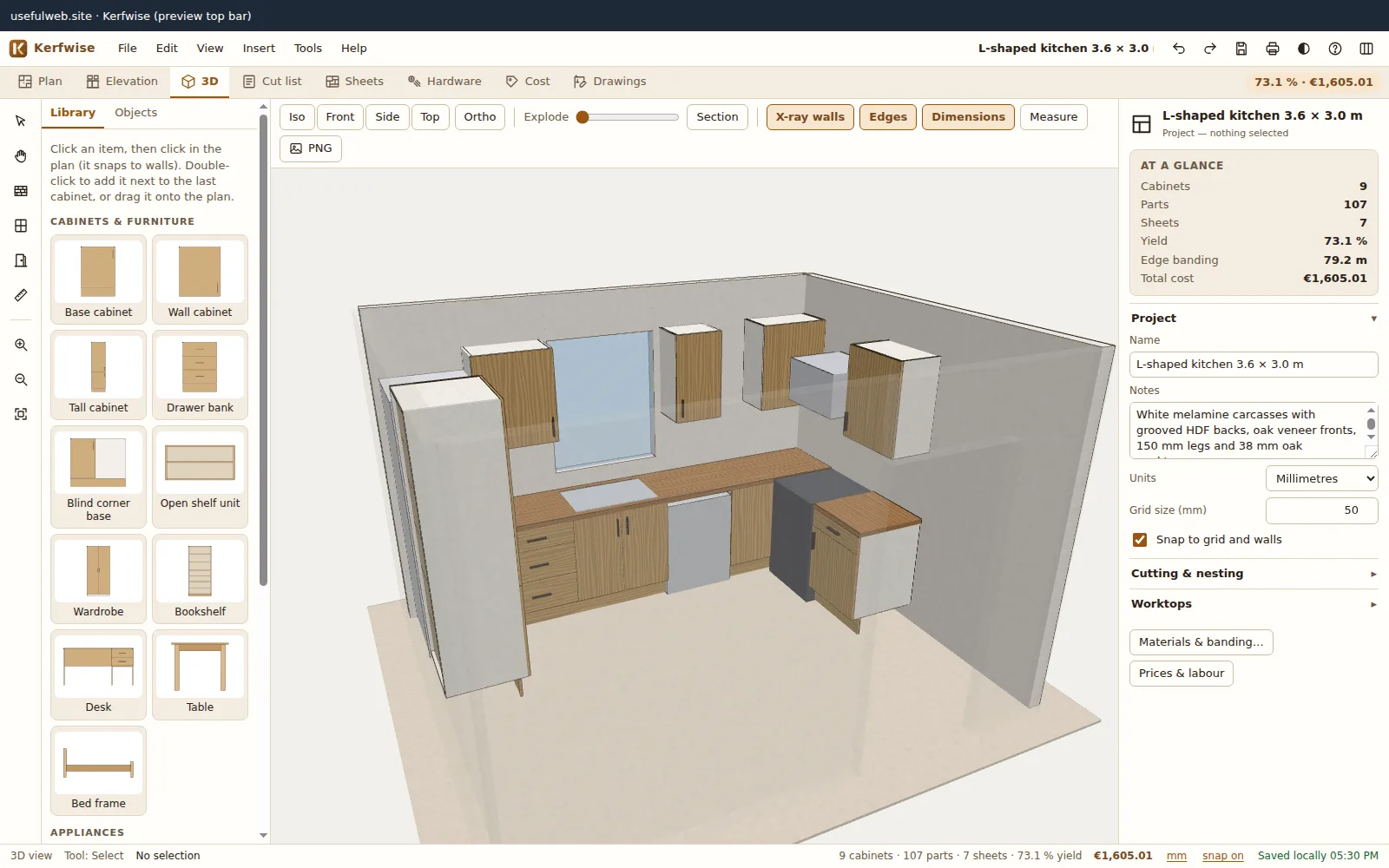 3D view of an L-shaped kitchen with automatic worktops
 Kitchen layout: cabinets snap to walls and to each other
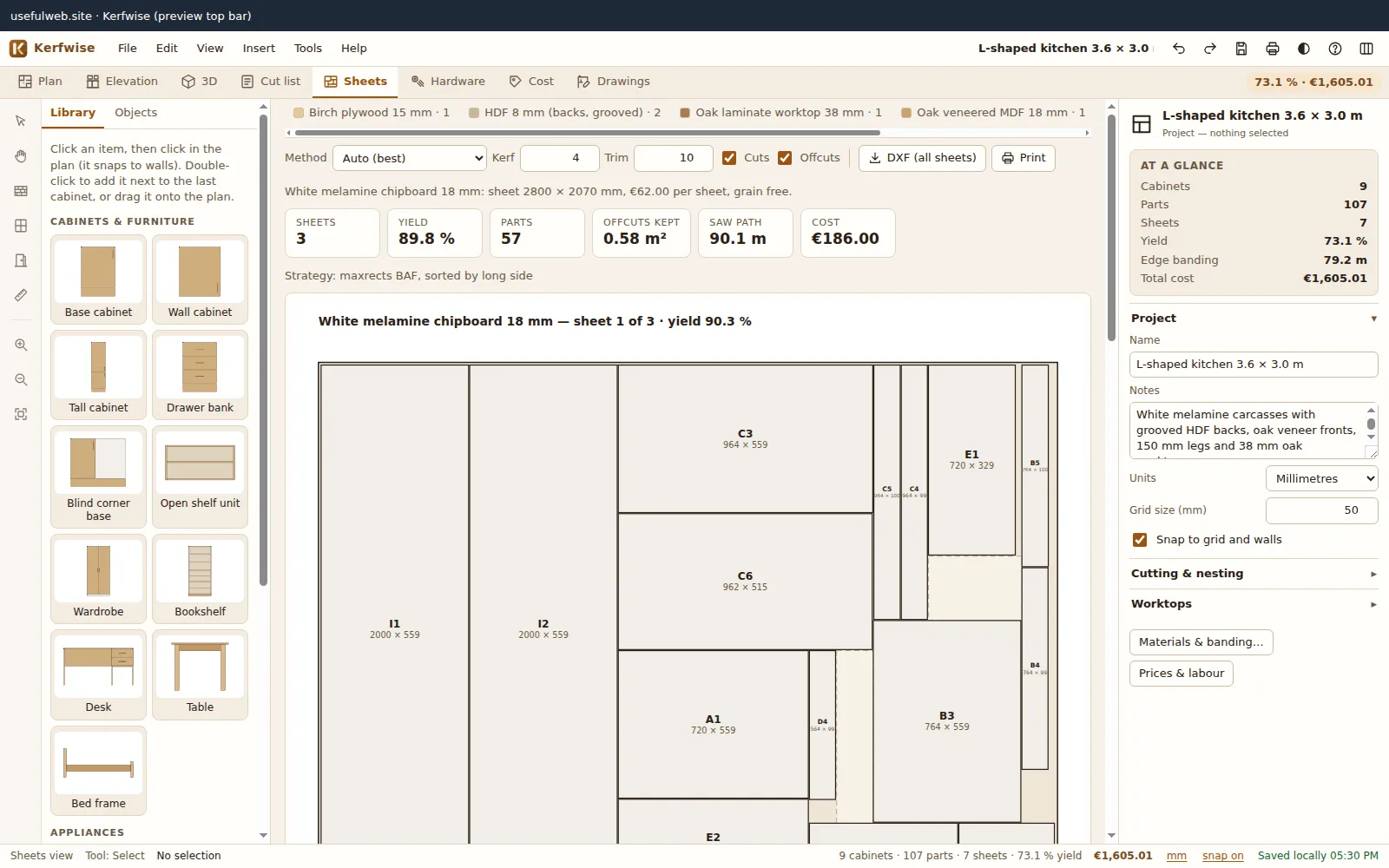 Sheet nesting with kerf, trim, grain, yield and offcuts
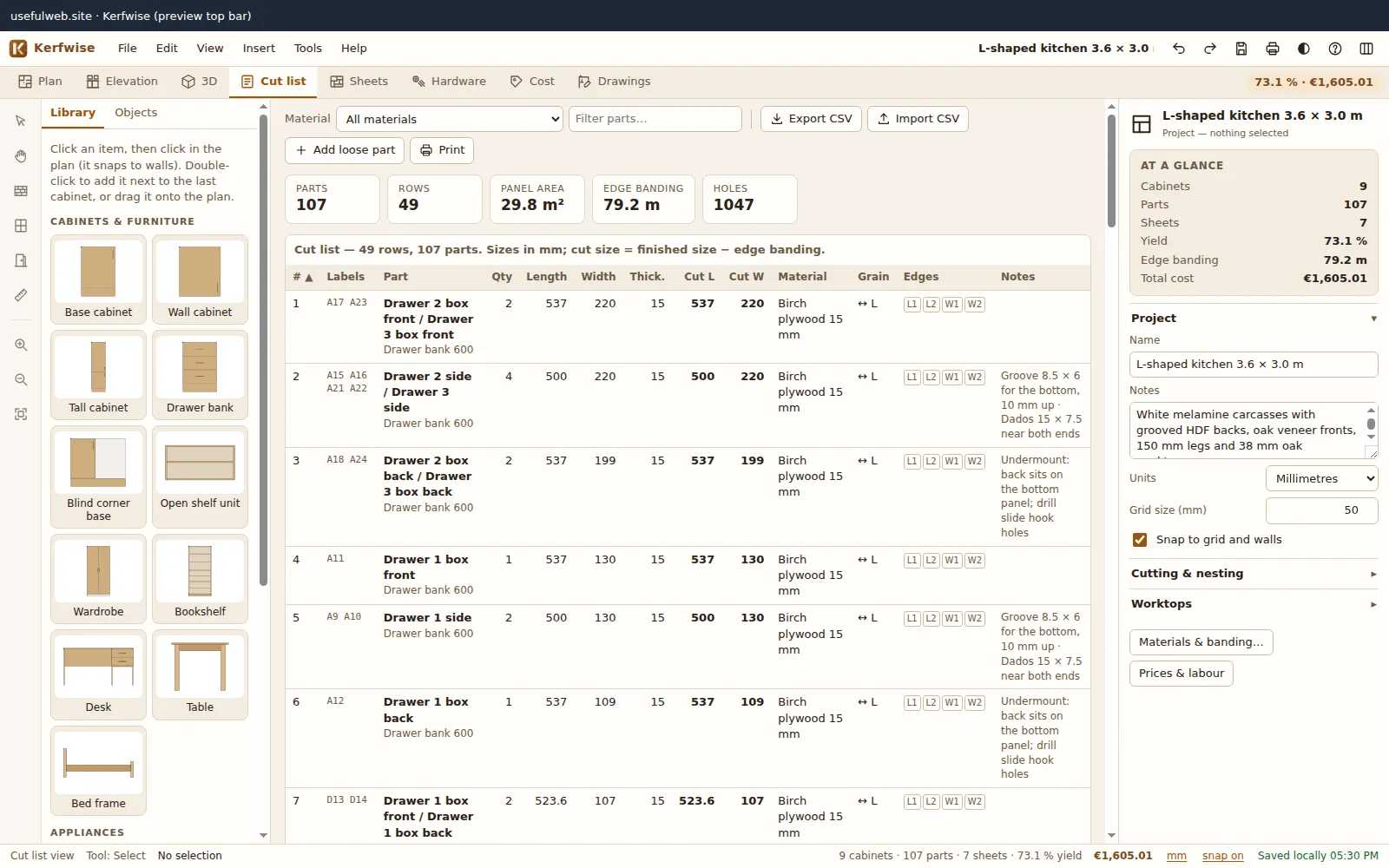 Grouped cut list with edge banding per edge
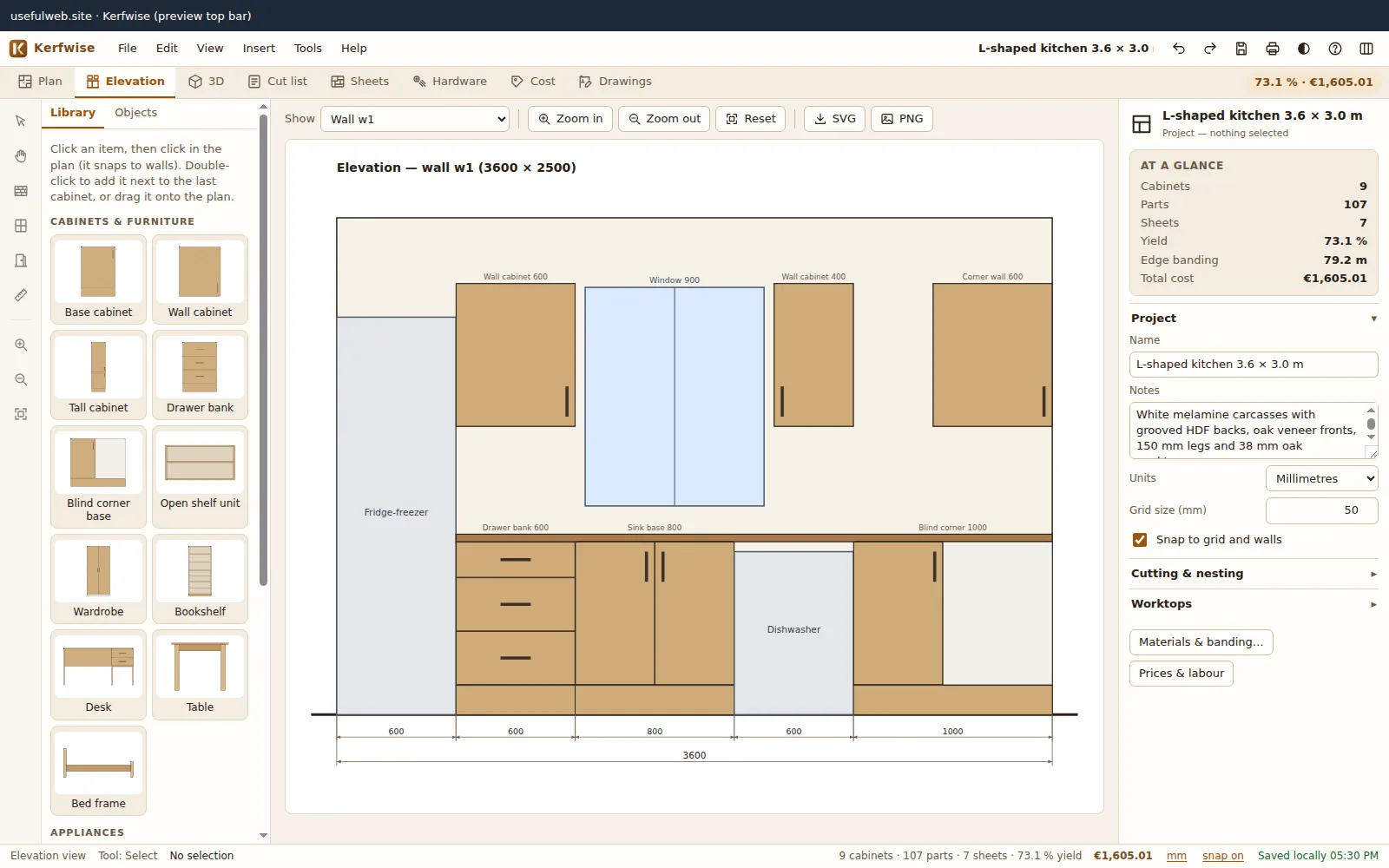 Wall elevations with dimension chains
 Exploded assembly view
 Production drawings with drilling patterns
 Cost estimate with editable prices and labour
 Furniture beyond kitchens — dark theme
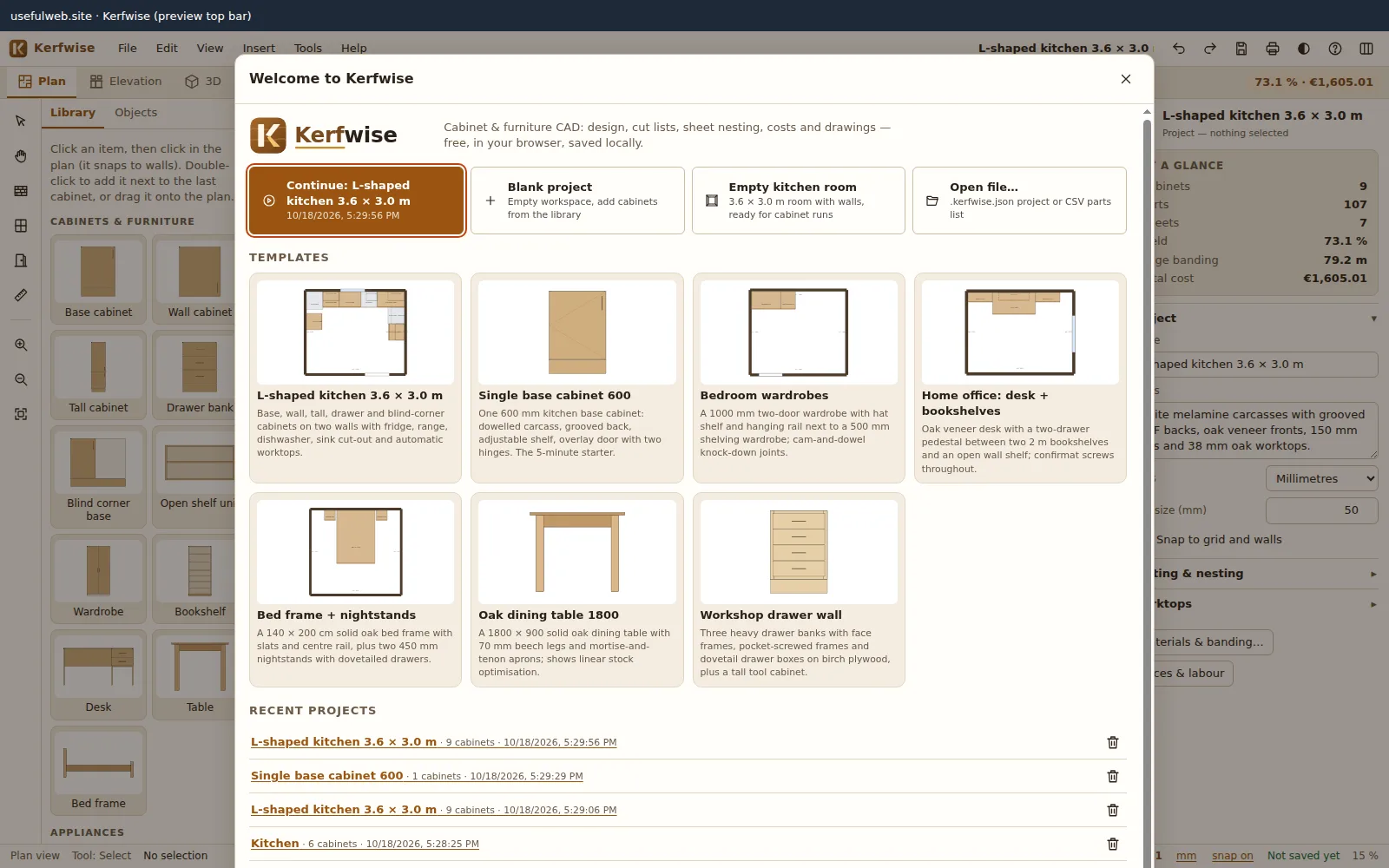 Templates and recent projects on the start screen
Features
Parametric cabinet library
Base, wall, tall, drawer bank, blind corner, open shelf, wardrobe, bookshelf, desk, table and bed frame — every size, material and option is a live parameter.
Diagonal, L-shaped & angled cabinets
Diagonal corner base and wall cabinets with a 45° door, L-shaped corners with bi-fold or two doors, angled end cabinets and quarter-round end shelves — polygon carcasses with bevel notes, angled hinges and shaped shelves.
Real joinery rules
Butt + screws, dowels, confirmat, pocket screws, cam & dowel, dado, rabbet, mortise & tenon and dovetail drawers change part sizes, drilling and hardware.
Kitchen layout & worktops
Draw walls, windows and doors, drop appliances, and cabinet runs snap to the walls. Worktops get overhangs, sink/hob cut-outs and butt, 45° mitre or one-piece L/U corners, with postformed, bevelled or rounded front edges.
3D view with exploded & section
Hand-written WebGL viewer: bevelled panel edges, real bar, knob, cup, gola-profile and push-to-open handles, procedural wood grain, soft shadows, exploded assembly, section plane and a measure tool.
Elevations
Wall elevations with cabinets, fronts, handles, worktops, windows and dimension chains, plus front/side/top views of every cabinet.
Automatic cut list
Grouped parts with finished and cut sizes, grain direction, edge banding per edge (L1/L2/W1/W2) and banding metres — CSV export and CSV import.
Sheet nesting optimizer
Guillotine (panel saw) and MaxRects (CNC) with kerf, trim and grain lock; L-shaped and angled parts nest as polygons with their notches reused. A deep search reports the gap to the proven lower bound.
CNC G-code export
Per-sheet G-code for GRBL, LinuxCNC or Fanuc-style controls: radius-compensated profiles, ramps, tabs or onion skin, G81/G83 drilling for hinge cups, shelf pins and dowels, toolpath preview and machining time.
Grain-aware materials
Melamine, veneered MDF, plywood, solid panels, HDF backs, linear stock, worktops and slabs, each with its own sheet size, price, grain and colour.
Drilling & hardware
System 32 shelf-pin rows, hinge cups by door height, mounting plates, slide screws and joint holes on every part, with a priced hardware list.
Cost estimate
Sheets or used area, edge banding per metre, hardware, editable labour minutes, worktop cut-outs, markup and tax — all prices editable.
Production drawings
Dimensioned part drawings with ordinate hole positions, assembly views and a print view for the workshop or a PDF.
Open formats
JSON project files, CSV cut and hardware lists, SVG and DXF R12 sheet layouts and part outlines, G-code and per-sheet DXF with toolpaths, PNG renders.
Local-first, and for AI agents
Autosave in your browser, undo/redo, no account. Four engine tools — cabinet builder, cut list, sheet nesting and CNC G-code — via JSON API and MCP.


Templates
Start from a ready-made project and change it to fit.
L-shaped kitchen 3.6 × 3.0 m
Base, wall, tall, drawer and blind-corner cabinets on two walls with fridge, range, dishwasher, sink cut-out and automatic worktops.
L-shaped kitchen with a diagonal corner
Diagonal corner base and wall cabinets, a one-piece L worktop nested on a slab, an angled end cabinet and a quarter-round open end shelf; profile (gola) handles.
CNC-ready wardrobe wall
Two wardrobes and an L-shaped corner unit nested for a CNC router: 8 mm gap for a Ø6 end mill, deep nesting search, dowel holes and hinge cups drilled by the machine (LinuxCNC G-code).
Single base cabinet 600
One 600 mm kitchen base cabinet: dowelled carcass, grooved back, adjustable shelf, overlay door with two hinges. The 5-minute starter.
Bedroom wardrobes
A 1000 mm two-door wardrobe with hat shelf and hanging rail next to a 500 mm shelving wardrobe; cam-and-dowel knock-down joints.
Home office: desk + bookshelves
Oak veneer desk with a two-drawer pedestal between two 2 m bookshelves and an open wall shelf; confirmat screws throughout.
Bed frame + nightstands
A 140 × 200 cm solid oak bed frame with slats and centre rail, plus two 450 mm nightstands with dovetailed drawers.
Oak dining table 1800
A 1800 × 900 solid oak dining table with 70 mm beech legs and mortise-and-tenon aprons; shows linear stock optimisation.
Workshop drawer wall
Three heavy drawer banks with face frames, pocket-screwed frames and dovetail drawer boxes on birch plywood, plus a tall tool cabinet.
For AI agents
Kerfwise runs on a deterministic engine. The same functions are available as tools with a JSON API and MCP, so scripts and AI agents get exactly the results the app shows.
- Kerfwise Cabinet Builder – Parametric cabinet → every part with cut sizes, edge banding, drilling and hardware.
Tool page ·POST https://kerfwise.usefulweb.app/api/v1/tools/kerfwise-cabinet-builder/calculate· MCPkerfwise_cabinet_builder - Kerfwise Cut List & Cost – Cabinets or a Kerfwise project → cut list, edge banding, hardware, sheets and costs.
Tool page ·POST https://kerfwise.usefulweb.app/api/v1/tools/kerfwise-cut-list/calculate· MCPkerfwise_cut_list - Kerfwise Sheet Nesting Optimizer – Nest rectangular and shaped parts on sheets: kerf, grain, yield, lower bound, offcuts, SVG + DXF.
Tool page ·POST https://kerfwise.usefulweb.app/api/v1/tools/kerfwise-sheet-nesting/calculate· MCPkerfwise_sheet_nesting - Kerfwise CNC G-code Generator – Nest parts and get CNC router G-code: compensated profiles, tabs, ramps, drilling cycles, time.
Tool page ·POST https://kerfwise.usefulweb.app/api/v1/tools/kerfwise-cnc-gcode/calculate· MCPkerfwise_cnc_gcode
- MCP endpoint (Streamable HTTP):
https://kerfwise.usefulweb.app/mcp - Project file format (JSON Schema): https://kerfwise.usefulweb.app/project.schema.json
- OpenAPI description: /openapi.json · llms.txt · API & MCP
Build a project through the API, then open it in the app with a link to https://kerfwise.usefulweb.app/app#project=<base64url JSON>.
Import & export
Import
- Kerfwise project (.kerfwise.json)
- CSV parts list (name, qty, length, width, material, grain, edges)
- Project link (#project=…)
Export
- Kerfwise project (.kerfwise.json)
- Cut list CSV
- Hardware list CSV
- Sheet layouts SVG
- Sheet layouts DXF R12
- Part outlines + drilling DXF R12
- CNC G-code per sheet (GRBL .gcode, LinuxCNC .ngc, Fanuc-style .nc)
- CNC sheet DXF with toolpaths and drill layers
- Elevations & drawings SVG/PNG
- Floor plan SVG/PNG
- 3D render PNG
- Print / PDF
Keyboard shortcuts
| Keys | Action |
|---|---|
| Ctrl + Z / Ctrl + Y | Undo / redo |
| Ctrl + S / Ctrl + Shift + S | Save / save as project file |
| Ctrl + O | Open project or CSV |
| Ctrl + C / Ctrl + V / Ctrl + D | Copy / paste / duplicate |
| Delete | Delete selection |
| R | Rotate selection 90° |
| Arrow keys | Nudge by the grid (Shift ×10) |
| V H W N D M | Select, pan, wall, window, door, measure |
| 1 – 9 | Plan, elevation, 3D, cut list, sheets, CNC, hardware, cost, drawings |
| F / + / − | Zoom to fit / in / out |
| E / X | Exploded view / section plane |
| G | Toggle snapping |
| Ctrl + P | Print / PDF |
| ? | Shortcut sheet |
Frequently asked questions
Is Kerfwise really free?
Yes. It runs entirely in your browser, needs no account and stores projects locally. The site is financed by ads outside the workspace.
Where are my projects stored?
In your browser (IndexedDB) on this device, saved automatically. Use File → Save to keep a .kerfwise.json file or to move a project to another computer.
How accurate are the cut sizes?
They follow the joinery rules shown in each tool’s methodology (e.g. side height = cabinet height − plinth, grooved back = inner width + 2 × groove depth, cut size = finished size − banding). Always check your own hardware data and do a test cut before cutting expensive sheets.
Which sheet sizes and saws are supported?
Any sheet size, with presets like 2800 × 2070, 2440 × 1220 and 3050 × 1220. Guillotine layouts can be cut on a panel saw or table saw; MaxRects layouts are tighter and meant for CNC routers.
Can I use it for things other than kitchens?
Yes: wardrobes, bookshelves, desks, tables, bed frames and drawer units are built in, and you can add loose parts by hand or import them from CSV.
Can I send the layouts to my CNC or CAD program?
Yes, two ways. The CNC tab writes G-code per sheet for GRBL, LinuxCNC or Fanuc-style controls (tool-radius compensation already in the path, ramps, tabs or onion skin, drilling cycles, small parts first) with a toolpath preview and machining time. Or export DXF R12 (millimetres, layers for parts, labels, cut-outs, holes per diameter and depth, toolpaths) into your own CAM software.
Is the sheet layout optimal?
Kerfwise reports a lower bound on the number of sheets (from the part areas and from parts too big to share a sheet). When the layout uses exactly that many sheets it is proven optimal and says so; otherwise it shows the gap. The optional deep search tries hundreds of seeded variations and stops as soon as the bound is reached.
Which corner solutions are there?
Blind corners, diagonal corner base and wall cabinets (45° door on angled hinges), L-shaped corner cabinets with a bi-fold door pair or two doors with a corner post, angled end cabinets and quarter-round open end shelves. Worktop corners can be butt-jointed, mitred at 45° (bolts + biscuits) or made as one-piece L/U tops nested on a slab.
Can an AI agent create a project for me?
Yes. The kerfwise-cabinet-builder, kerfwise-cut-list, kerfwise-sheet-nesting and kerfwise-cnc-gcode tools are available via the JSON API and MCP. Results include an “open in app” link with the project in the URL fragment.
Limitations
What Kerfwise does not do (yet):
- Shaped cabinets cover the common corner types (diagonal, L-shaped, angled end, quarter round); free-form curved fronts and bent doors are not modelled, and quarter-round shelves are open (no curved doors).
- Nesting is heuristic: a layout is proven optimal only when it reaches the lower bound (gap 0); shaped parts are nested by their bounding box plus the notches inside it, not by true free-form polygon interlocking.
- CNC output is 2.5D for a 3-axis router: face drilling and profiles only. Edge holes (dowels in panel edges, cam bolts) and angled pocket holes are listed but need a horizontal drill or a jig; pockets, grooves and engraving are not milled. Always simulate the program before running it.
- Hardware positions follow common European (System 32, Blum-style) defaults; check your exact hinges and slides.
- The 3D view needs WebGL; edges are bevelled, not truly rounded, and textures are procedural (no photo materials).
- Phones get a simplified, mostly read-only layout; editing is best on a tablet or desktop.
Tutorials
Learn Kerfwise step by step.
- Your first cabinet in 5 minutesOpen Kerfwise, start from the base-cabinet template, change its size and doors, and get a cut list, sheet layout and drawings — no account needed.Beginner 5 min
- Plan a kitchen with walls, appliances and worktopsDraw the room, add windows and doors, place appliances and cabinet runs that snap to the walls, and let Kerfwise generate worktops with sink and hob cut-outs.Beginner 15 min
- Joinery, back panels and cut sizes explainedHow Kerfwise turns a cabinet size into part sizes — plinths, dados, rabbets, grooved backs, drawers, doors, hinges and edge banding — with worked numbers you can check.Intermediate 12 min
- Sheet nesting, grain and offcutsGet the most out of every sheet — choose guillotine or MaxRects, set kerf and trim, lock the grain, read the yield, reuse offcuts and export DXF for your saw or CNC.Intermediate 10 min
- Costs, hardware and production drawingsTurn a design into a quote and a workshop pack — material and banding prices, hardware list, labour minutes, markup and tax, part drawings with drilling and a printable PDF.Intermediate 10 min
- Import a CSV parts list and add loose partsBring parts from a spreadsheet or another program into Kerfwise, mix them with designed cabinets, and nest everything together.Intermediate 8 min
- Automate Kerfwise with the API and MCPCall the Kerfwise engine from scripts and AI agents — cabinet builder, cut list, sheet nesting and CNC G-code as JSON API and MCP tools, with real request and response examples.Advanced 15 min
- Corner cabinets and worktop jointsBuild an L-kitchen with a diagonal corner cabinet, an L-shaped corner with bi-fold doors, an angled end and a quarter-round shelf — and choose butt, mitred or one-piece L worktops.Intermediate 12 min
- CNC G-code exportTurn nested sheets into router G-code for GRBL, LinuxCNC or Fanuc-style controls — tool library, radius compensation, tabs, drilling cycles, cut order, simulation, machining time and DXF.Advanced 15 min
Ready to try it?
Other premium apps
-

Kinetica
Robot motion studio
Simulate robot arms in your browser: kinematics, trajectories, collisions, program export.
-

Threadsmith
Embroidery digitizing studio
Draw or import artwork, turn it into real stitches, and export DST/EXP for your machine.
-

Ohmforge
Virtual electronics workbench
Draw a circuit, switch it on, and measure it with real-feeling bench instruments.
-

Twinworks
Factory digital twin & production simulation
Model a production line, simulate it and find the bottleneck — free, in your browser.
-

Flipline
Drawing, pixel art & animation
A few drawings. A little life. Make a flipbook in your browser.
-

Lumina
Photo editor & image toolkit
Bring out what you saw. A free photo studio, right in your browser.